

Procedures for Thesis Approval to Defense for Professional Doctorate and Master's Students
Workflow for Proposal Approval
1- Inquire about the guidance and consultation capacity of the desired professors for collaboration on the dissertation (refer to the department head);
2- Select the supervisor and advisor and enter their information in the "Supervisor Appointment" form
3- Obtain the "Master's Proposal" or "Doctoral Proposal" and type the proposal
4- Receive the IranDoc tracking code:
- To receive this code, visit the "IranDoc" system and register;
- After registering, log in to the IranDoc system with your username and enter the proposal topic information in the proposal section and follow the steps to receive the tracking code;
5- Register the proposal in the "Golestan" system via the following path

5- Submit the proposal along with the "Supervisor Appointment" form to the department head for discussion in the departmental council;
6- Determination of the evaluator and defense date by the academic department;
Workflow for Master's and Doctoral Dissertation Defense
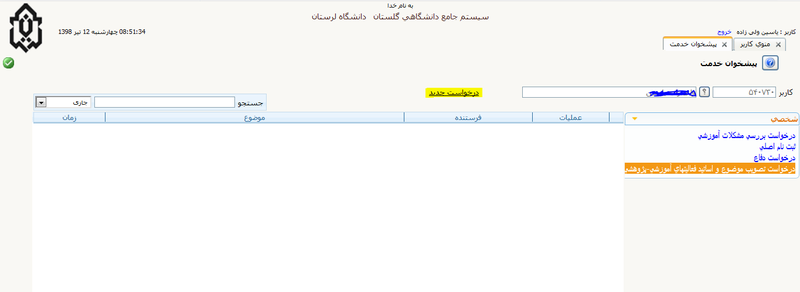
1- Registration of the dissertation title and abstract by the student in the "Service Dashboard" form available in the Golestan system;
How to register the dissertation in the system:
2- Submit a copy of the dissertation along with the "Doctoral Dissertation Defense Proposal" or "Master's Dissertation Defense Proposal" form to the supervisor for discussion in the departmental meeting and to determine the defense date and dissertation evaluator;
3- Register the entire dissertation on the plagiarism detection site (tik.irandoc.ac.ir);
4- Approval of the "Plagiarism Certificate" by the supervisor (Guide File);
5- Approval of "Form No. 4 B" by the dissertation evaluator(s);
6- Print and approve report 2359 from the Golestan system by the department head;
7- Refer to the education expert and submit the defense proposal forms, plagiarism confirmation, Form No. 4 B, ownership and authenticity form (Parsa) along with the approved report 2359 at least 10 days before the defense date;
8- Install the defense announcement in the announcements panel by the student at least one week before the defense